How to choose order management for Shopee, Lazada and TikTok Shop
What to check before paying for order-management software that brings marketplace orders into one place.
Last reviewed: 11 November 2026 · Asia/Shanghai (UTC+8)
This is for sellers on Shopee, Lazada, or TikTok Shop who are deciding whether to pay for order-management software. One shop can need it. Several shops can still do without it. This guide does not recommend one product—it helps you decide what you need and what to check.
Orders from different shops in one list
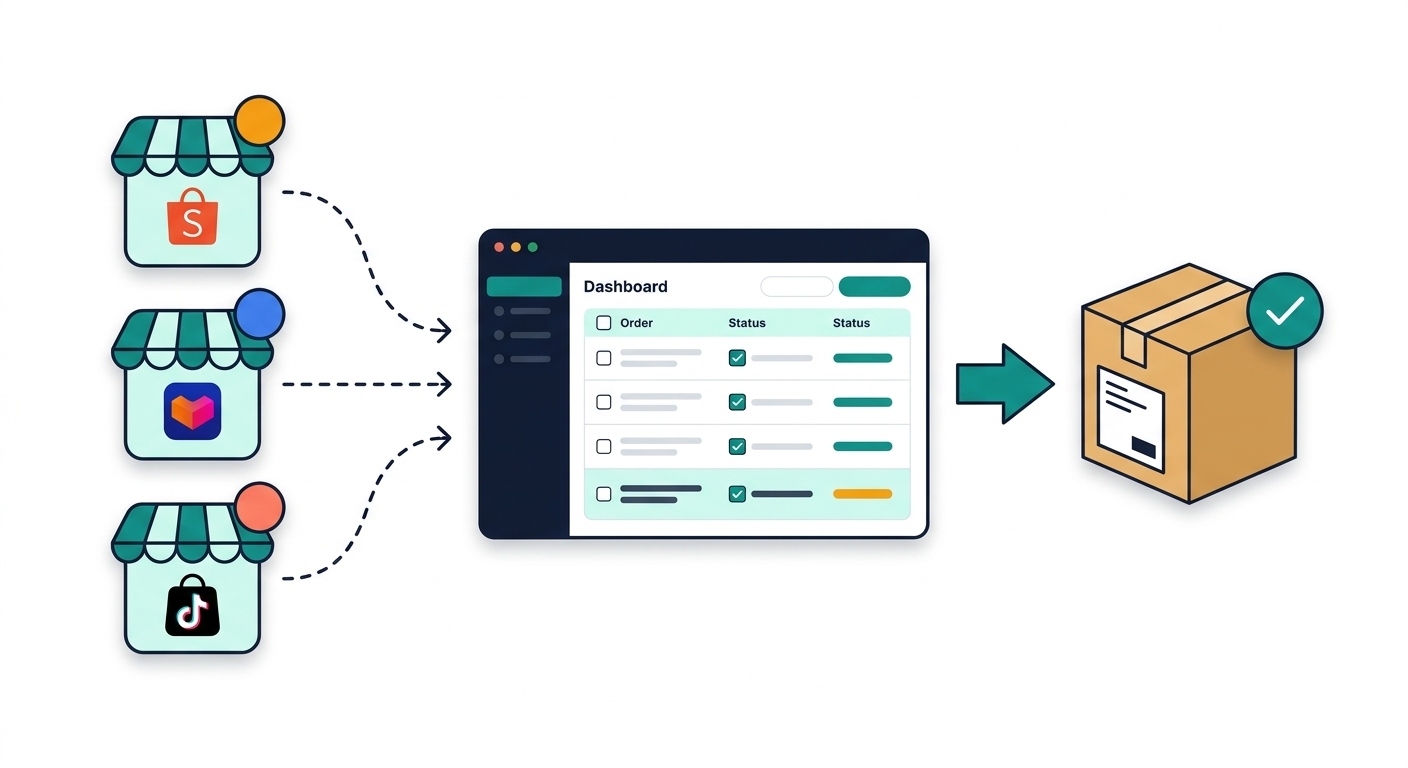
- Seller appsOrders start in each marketplace app.
- One listSoftware may combine orders for picking and may update status or tracking where supported.
- Orders are packed and shippedYou, your supplier, or a fulfilment company handles packing and shipping.
Illustration only: example picture, not a product CompareOps tested.
Storefront logos are examples—not proof every tool connects to those marketplaces. Countries, connections, and features vary.
Software is not a physical fulfilment service; it may pass orders and tracking where those connections are supported. The checkmark on the parcel is not a promise every order succeeds.
This guide is about bringing marketplace orders into one place. It also covers status updates and tracking, where the tool supports them. You, a supplier, or a fulfilment company may still pack and ship the goods.
An order tool is not inventory-sync software. Inventory sync keeps stock numbers aligned across shops. For stock numbers, use How to choose inventory-sync software. A good stock match does not prove the order workflow will fit you.
What follows is editorial advice, not a product test. CompareOps has not independently tested the products named here.
Read a vendor's own pages before you rely on a claim. Use the tool list only after a listing shows Sources and evidence and a last full information check. How to read a listing explains those marks.
First, write down what you have and what you need
Write down the countries you sell in, your shop accounts, and the marketplaces. Note how you send orders out: you pack and ship yourself, you use marketplace delivery, another company's warehouse ships for you, or you have more than one packing location. Add your own online store or shop checkout system if you use one. Writing down these details will help you compare software more easily.
Order work: stay on marketplace apps or look at software?
You may not need new software
The marketplace seller app, or a simple export, may still be enough. This is not a rule that you must wait.
- You work through each shop's order list before the day's shipping cutoff.
- Orders are rarely sent late, and marketplace status updates are rarely missed.
- Time spent switching apps is small next to the cost and setup of a tool.
A single shop can still need software. Add up the hours spent on orders, and how often orders go out late. Do not decide from the number of shops alone.
Software may help with these problems
These are reasons it is worth looking—not an instruction to buy the first product you open.
- Orders for the same day sit in more than one seller app, and more than one person updates them.
- Shipping labels, tracking numbers, or status changes are already late, or are copied by hand.
- Returns, cancellations, or split shipments take a regular part of the day to fix.
If some points fit you and others do not, add up your hours and late or cancelled orders before you pay.
What to check
An order-management system is a shared workspace for marketplace orders. It is not inventory-sync software, which keeps stock numbers aligned. It is not a branded storefront, a shop checkout system, an ads manager, or a chat inbox.
A warehouse service picks, packs, and stores goods. Do not assume that service is in the plan you were quoted. Do not assume an inbox or a shop checkout connection is included either. A marketplace name on the homepage is not a connection for your country site or seller type.
Countries and accounts
Check that the tool can connect to the shops you actually use.
- Which shops connect. Which of your countries, marketplaces, and shop accounts can connect today.
- Seller type. A seller type is the kind of shop account, such as a local shop or a cross-border shop. Check that yours is supported. A cross-border shop sells into another country.
- Approval. Whether a connection needs the vendor's help or a special marketplace approval.
Order workflow
Check how orders move from the marketplace into packing and tracking updates.
- New orders. How new orders arrive in the tool.
- Packing and labels. How packing lists or shipping labels are printed, and how a tracking number is sent back to the marketplace—whether you, a supplier, or a fulfilment company handles the physical step.
- Cancellations and returns. What happens on a cancellation, return, or failed update.
- Unknown workflow. If the vendor cannot describe that path, treat the workflow as unknown.
Stock
If you also need stock numbers to stay the same across shops, use the inventory-sync guide. Do not assume an order tool updates every shop's stock.
Plan caps and extra fees
Check the real cost, not only the starting price.
- What the plan limit counts: orders, shops, labels, or add-ons.
- Billing basics. The billing period, the currency you will actually be billed in, and what happens when you pass the cap.
- Extra fees. Whether setup, onboarding, extra stores, labels, or add-ons cost extra.
- Different prices. A "from" price, a promotional annual price, and a month-to-month price are not the same figure. This guide does not quote prices.
Support, a small try, and leaving
Check support, try the tool on a safe shop, and know how to leave.
- Languages and hours. Which languages the support team replies in, and which hours they cover in your time zone.
- A small try. A free trial is not guaranteed. If one is offered, connect a shop that is not your main account. On that shop, try a few normal orders: a label or tracking update, a status change, and a cancellation or return.
- Leaving. How to export order history and how to cancel—before you move every shop.
Red flags
- A homepage lists Shopee, Lazada, or TikTok Shop, but no page you can open names your country, seller type, or connection steps.
- The quoted price leaves out setup, onboarding, extra shops, or modules you will need on day one.
- A promotional annual price is treated as the ongoing cost, or paid pricing for your market is not on a page you can open.
- Official pages give different store or channel limits for the same plan, and the vendor has not said which number is the right one.
- Chat, warehouse, or shop checkout system features are described as included, but the plan page does not say so.
These are editorial warning signs, not findings from a CompareOps product test.
Checklist
- Countries, shops, marketplaces, how you ship orders, and any online store or checkout system are written down.
- You know which of those accounts the product can connect today, including seller type.
- You know how orders arrive, how labels and tracking are handled, and what happens on a cancellation, return, or failed update.
- You know the billing period, payable currency, plan cap, and any setup, overage, add-on, or onboarding cost, plus support language and hours.
- You know whether a small trial exists, whether you can export order history, and how to cancel.
- You have weighed the hours and late or cancelled orders, including if you have only one shop.
If an answer is still unknown, do not assume the tool can do it. This page is not a shortlist.
Next steps on CompareOps
Open Order management to see five published listings (BigSeller, EasyStore, Ginee, Indexync, Zetpy). Read the evidence label on each claim. It describes that claim, not the whole product. These pages are not a ranked shortlist and not a CompareOps test.
On Tools, filter by marketplace—for example Shopee, Lazada, or TikTok Shop. Read Unconfirmed fields before you assume a tool fits your country.
You can compare up to three tools at once on Compare, or open an example grouping such as BigSeller, Indexync and Zetpy or BigSeller, EasyStore and Ginee. These are sample groups, not recommendations. Check country support, plan limits and costs on each listing.